Blogs

Why Choose an Industrial PC for Your Business?

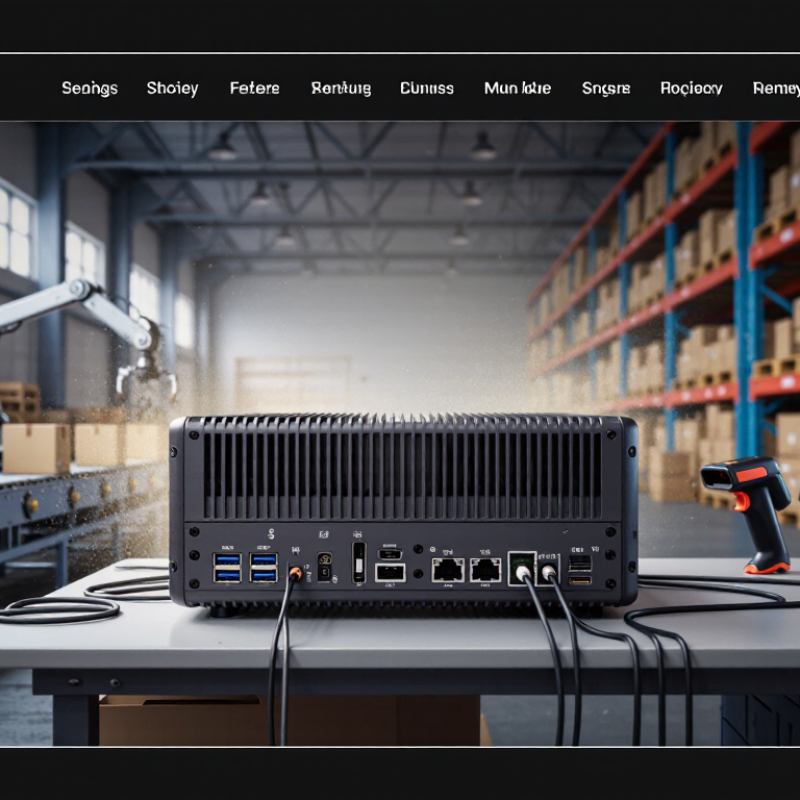
Choosing an Industrial Pc is less about buying a tougher computer and more about matching computing hardware to daily operating conditions. A packaging line may need reliable control through dust, vibration, and long shifts. A warehouse terminal may need stable connections to scanners, displays, and sensors. The right system can support these tasks without forcing a business to redesign its entire workflow.

Industrial computers often offer durable enclosures, broader operating-temperature ranges, and configurable input and output ports. These features can matter when a standard office PC faces heat, continuous use, or limited space. But specifications need careful reading. Temperature ranges, protection ratings, and component lifespans vary by model; the label “industrial” alone proves little. Check the actual environment, required interfaces, software compatibility, and support period before choosing. Small details count.

There is also a practical business case. A suitable system may reduce interruptions and make maintenance easier, especially when it fits existing equipment and processes. Yet the most rugged option is not automatically the best investment. It may add cost without solving a real problem. Compare purchase price with installation, service, replacement, and downtime costs, using evidence from your own operation where possible. Ask vendors for clear specifications and test systems under realistic conditions. No machine is failure-proof. A careful choice starts with honest limits: how the computer will be used, what must keep running, and what a failure would actually cost.
Why Choose an Industrial PC for Your Business?

What Defines an Industrial PC?

An industrial PC is a computer designed to keep working in demanding settings, such as a factory floor, warehouse, or outdoor control cabinet. Its defining features are not just a tough case. The processor, storage, power supply, and cooling system must suit the conditions where the computer will run. That matters. Dust, vibration, heat, and sudden power changes can shorten the life of ordinary office equipment. Industrial models may use sealed enclosures, fanless cooling, secure mounting, and a wider operating-temperature range. These features vary, so check the specifications rather than relying on the label alone.

Tips: Match the computer to the actual site. Check temperature limits, ingress protection, vibration tolerance, mounting options, and required ports. A plant technician may need serial connections, while a vision system may need several high-speed ports. Also ask how long replacement parts and technical support will remain available.

“Industrial” does not mean indestructible. A sealed unit can still overheat if installed in a cramped cabinet, and a fanless design may have performance limits. No system is perfect. Review the workload, ambient temperature, and maintenance plan before choosing. It is easy to focus on ruggedness and overlook service access, which can make routine repairs awkward. A suitable industrial PC balances durability with the computing power and connectivity the job truly requires.

Why Choose an Industrial PC for Your Business? — What Defines an Industrial PC?

Business Requirement What Typically Defines an Industrial PC Potential Business Benefit
Operating environment Models are designed for specific environments and may support wider operating-temperature ranges than ordinary office PCs. The supported range varies by model and configuration. Helps equipment operate in locations such as factory floors, control rooms, and outdoor enclosures when the selected unit is rated for those conditions.
Mechanical durability Chassis, connectors, and mounting options may be designed to withstand vibration, dust, or frequent use. Environmental protection should be verified from the product’s stated ratings. Can reduce exposure to common workplace hazards and help avoid interruptions caused by unsuitable hardware.
Cooling and ventilation Some industrial PCs use fanless designs or sealed enclosures; others use fans. The right approach depends on heat output, ambient temperature, and enclosure conditions. Fanless designs can limit moving parts and reduce dust intake, while adequate thermal design helps protect performance and component life.
Connectivity Configurations may offer multiple Ethernet ports, serial ports, USB, digital I/O, or other interfaces used by industrial equipment. Supports integration with sensors, controllers, scanners, machines, and existing network infrastructure without relying on unnecessary adapters.
Mounting and installation Common options include DIN-rail, wall, panel, and rack mounting, depending on the model. Allows the computer to fit into a control cabinet, production line, operator station, or other space-constrained installation.
Power input Some models accept a range of DC input voltages or provide features such as ignition control for vehicle applications. Input requirements are model-specific. Can simplify installation where standard desktop power arrangements are not available, provided the power supply matches the unit’s specifications.
Product availability and lifecycle Industrial product lines may offer longer availability or more controlled configuration changes than consumer-focused products. Actual lifecycle commitments vary by supplier and model. Can make it easier to plan replacements, maintain compatible systems, and manage long-running deployments.
Reliability planning Industrial PCs are selected and specified for defined operating conditions; no design makes a computer immune to failure. Reliability depends on installation, workload, maintenance, and environment. Matching the hardware to the application can support more predictable operation and reduce avoidable downtime.
Compliance and protection ratings Some units carry specific safety, electromagnetic compatibility, or ingress-protection ratings. These are not universal and should be checked against the exact model documentation. Helps businesses verify whether hardware meets the applicable site, industry, and installation requirements.
Best-fit applications Often used for machine control, industrial data collection, human-machine interfaces, process monitoring, and edge computing. Provides a purpose-built computing option where standard office computers may not suit the physical environment or required connections.

Selection note: Compare the exact operating-temperature range, vibration and ingress ratings, I/O, mounting method, power requirements, and lifecycle terms with your application before choosing a system.

Which Business Environments Need Industrial-Grade Computing?

Which business environments need industrial-grade computing? Start with the conditions, not the job title. Factory floors expose computers to vibration, dust, heat, and continuous shifts. Food-processing areas may require frequent washdowns. Cold-storage warehouses add low temperatures and condensation. Remote utility sites need reliable operation when visits from technicians are infrequent. Dust matters. So do loose cables and sudden temperature changes.

A 2024 True Cost of Downtime report, based on 500 large companies, estimated that unplanned downtime costs about $1.4 trillion annually. That figure is not specific to every small plant, but it shows why equipment reliability deserves attention. Industrial PCs can offer sealed enclosures, fanless cooling, wider operating-temperature ranges, and ports for older control systems. Match these features to the actual site: a washdown zone needs suitable ingress protection, while a vibrating vehicle may need secure mounting and tested connectors. More rugged is not automatically better. It can add cost, and some specifications may solve problems a site does not have. I would check temperature logs, dust exposure, and maintenance records before choosing a unit. A specification sheet alone rarely tells the whole story.

How Do Industrial PCs Improve Reliability and Operations?

Industrial PCs are built to keep control systems running where ordinary office computers may struggle. A sealed or fanless chassis can reduce dust entry and limit moving parts. A wide operating-temperature range helps equipment tolerate hot control cabinets and cold loading areas. Mounting a computer near machinery can shorten cable runs and keep sensor data moving with less delay. That matters when an operator needs a clear alarm, not a frozen screen. Still, no computer is invulnerable. Seals need inspection, and heat can build up inside a poorly ventilated enclosure.

Industrial models often include sturdy connectors and varied input/output ports, making it easier to link sensors, scanners, and older equipment. A stable platform can help reduce interruptions and give operators more consistent access to production data. It also makes routine tasks, such as checking a machine status screen, less dependent on a nearby office workstation. A rugged case cannot fix bad software or neglected maintenance. Teams still need to test backups, review system logs, and keep replacement plans realistic. In practice, the best reliability gains come from matching the PC to its actual location, workload, and service conditions.

What Features Should Businesses Compare Before Choosing One?

Choosing an industrial PC is less about peak processor speed than steady performance near heat, dust, vibration, and continuous workloads. Compare its operating-temperature range, cooling design, and tested vibration tolerance. Ask what conditions support each rating. A broad temperature claim means little if the system slows under sustained load. Small detail, big consequence.

Map every required connection before comparing models: Ethernet, serial ports, USB, display outputs, and expansion slots. Check storage type, memory capacity, and whether components can be replaced without removing the computer from its enclosure. Uptime Institute’s 2024 Annual Outage Analysis found that 54% of respondents said their latest significant outage cost more than $100,000. That figure covers outages broadly, not industrial PCs, but it highlights the value of serviceability and spare-unit planning.

Security and long-term support deserve equal attention. NIST’s guidance for operational technology recommends controls that account for reliability and safety needs, not just conventional IT security. Compare secure boot, firmware-update processes, access controls, and the supplier’s stated support period. A cheaper unit may fit today’s task but leave awkward upgrade gaps later. There is no perfect specification sheet; weigh the real site conditions against the features you will actually maintain.

Which Industries Commonly Use Industrial PCs?

Manufacturing is where industrial PCs are common: they monitor production lines, read sensor data, and show machine status beside noisy equipment. A sealed panel PC may sit near a conveyor, but enclosure ratings and cooling still matter. Dust is relentless.

Transportation operators use them in rail systems, fleet depots, and traffic-control cabinets. These computers can collect equipment data, manage schedules, or run passenger information displays. In warehouses, fanless units may reduce dust intake near forklifts and sorting belts. Still, no computer can fix an unreliable network; testing at the site matters.

Energy and utility teams use industrial PCs at substations, water-treatment facilities, and remote monitoring stations, where temperatures can swing and access is limited. Healthcare laboratories may use them to control analyzers or track samples, with cleaning compatibility checked before deployment. Farms use them for irrigation controls and machinery exposed to vibration. Conditions vary.

Choosing a unit is less about a rugged label than matching it to its real environment. A specification may look reassuring, while connectors, mounting, or maintenance access become weak points in daily use. Testing during a typical shift can reveal these details. It is an extra step, but one worth making.

Plug & Play Installation

Our installation services are top-notch, delivering modular systems for any application on time in plug & play condition. We leave nothing for you to figure out, set up, or fix. All you’ve to do is just step in, and get going with your business.

Dismantling & Reassembling

We hold a long-term view when we build modular rooms taking into consideration your changing needs. Whether it’s shifting your workspace to a new site, redesigning your unit to fit new requirements, or simply clearing the area at the end of the project, our Dismantling & Reassembling teams are pressed into service to get the job done in the quickest possible time and minimum resource wastage.

Interior Designing

Our interior designs combine both functional and aesthetic aspects to provide you with physical and emotional comfort. We ask you for your preferences and give the best possible solutions aligned to your tastes. Our units are built to be modern, stylish, and elegant.

Bespoke Solutions

We understand that every project is unique and therefore has a different set of requirements. That’s why we believe in customizing our solutions to fit individual needs. We are equipped with the right talents, technology, and skillset to offer bespoke modular units, without compromising on turnaround time or quality.

Aftersales Service

The benefits of choosing Containers ME continues long after the installation of the units as we provide aftersales service for as long as you need. All you have to do is sign the Annual Maintenance Contract (AMC) and enjoy technical support for all the maintenance-related issues. By signing the contract, you can rest assured that a highly professional team of dedicated staff are at your service all year round to attend to your needs.

Customized Container Solutions

We specialize in Customized Container Solutions designed to meet diverse needs across the UAE. Our offerings include customized modular containers that cater to various applications, from tailor-made container solutions to bespoke container designs.

Whether you’re looking for personalized container homes or custom modular containers, we have you covered. Our customized container offices provide functional workspaces, while our customized portable containers ensure flexibility on-site. Explore our range of custom container storage units and customized cargo containers to optimize your space.

We also offer custom container leasing and custom container fabrication services, along with customized sea containers designed for secure transport. For specialized needs, our specialized container modifications will help you create the perfect solution for your requirements in both Dubai and the broader UAE.

Get a quote

Get a quote